

Ik heb deze een jaar niet kunnen gebruiken wegens ziekte en nu heb ik inmiddels Windows 10 op mijn computer. Nu wil ik een gereden rit versturen naar de computer met de CicloTour die ik geïnstalleerd heb. Echter het lukt me niet. De fietscomputer is klaar 100% en de Ciclo Tour is pas op 19% en geeft dus ZeitUberschreitung aan. De COM poort staat op 1. Wie kan mij hiermee verder helpen en eventueel alles nalopen of hij goed geïnstalleerde is. Als er iemand bereid is dan stuur ik hem mijn email adres.
Groeten
Harie
HAC 4000
-
amclassic-fan

- Forum-lid HC
- Berichten: 24317
- Lid geworden op: 23 jun 2004 17:56
- Locatie: Leende
amclassic-fan
07 jun 2020 18:11
Ik vermoed dat er niet veel gebruikers meer zullen zijn. Het apparaat zal op z'n minst 10 jaar oud zijn en is door de tijd ingehaald.
W10 is overigens met meer oude seriële apparaten problematisch.
W10 is overigens met meer oude seriële apparaten problematisch.
‘Whatever you do, those other fuckers are doing more.’

Ik verwacht niet dat er nog veel actieve HAC gebruikers zijn.
Heb zelf nog een HAC 4+ liggen, maar ben inmiddels 2 Garmin Edges verder.
Draait de ciclotour software uberhaupt wel op de actuele windows versies eigenlijk? Die van mij heb ik op zeker moment verwijderd omdat het niet meer wilde draaien op (ik meen me te herinneren) windows 7.
Maar wie weet reageert er nog een actuele gebruiker.
 TL@
08 jun 2020 08:12
TL@
08 jun 2020 08:12
Geen ervaring met de HAC, wel met oude seriële dingen.
Beste oplossing: een Virtuele machine aanmaken (VM Ware is gratis voor thuis gebruikers) met een oude versie van Windows (XP of 7) en een USB-serial convertor (kost een paar euro), dit werkt perfect
Beste oplossing: een Virtuele machine aanmaken (VM Ware is gratis voor thuis gebruikers) met een oude versie van Windows (XP of 7) en een USB-serial convertor (kost een paar euro), dit werkt perfect

I am the author of CicloTour and unfortunately I cannot speak the Dutch language (sorry for writing in english therefore). I've just seeing the Hac4000 request by chance.
If this post violates the forum rules (advertising for example), please delete it -> I just remember the old days, when the Hac4 devices were state of the art and I am impressed in some way that some of these devices are still being used, yo maybe I'm able to help a little bit.
Are you using the latest CicloTour version (this should be a version >= 4.30). If you're using a Hac4Pro (4000) I assume, that the Hac4000 interface is a 'newer' USB based interface. The very old serial interfaces propably won't work with current Windows OS, but the USB based interfaces should work and at the CicloTour preferences dialog it's best to choose the USB1 Device (and not a COM-Port), because then the device will be adressed by the driver as a native USB device.
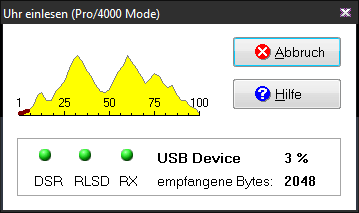
It's important that the download dialog will show a Pro/4000 Mode string in the caption bar of the download dialog, otherwise the download will not work with this device type, cause every HAC type has needed a special handling.
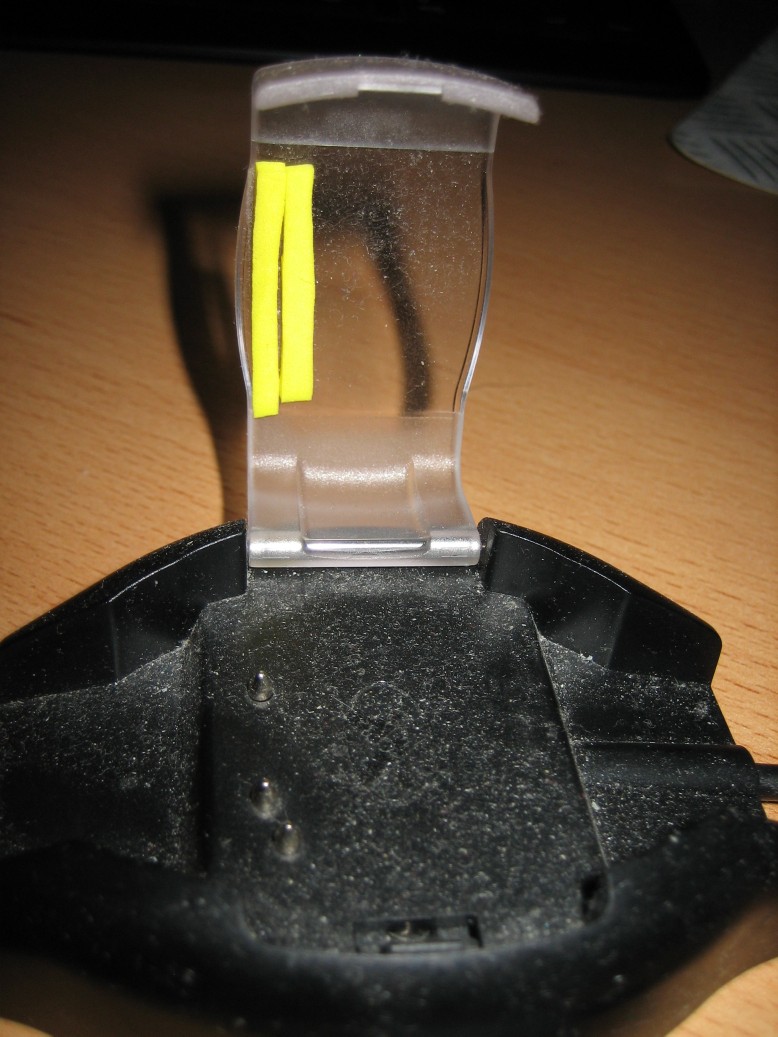
As far as I can remember there have been some mechanical issues with older interfaces: the cap of the interface lost pressure, so that the Hac device does not contact well to the pins of the interface. A little thin foam rubber between the interface cover and the Hac4 device was able to solve this problem.
Unfortunately the device is too old to investigate deeper, but I've done some tests some years ago when I adapt the device import routines to my TrainingLab Pro project (it's a kind of descendant of HRMProfil/CicloTour) and I was able to import some Hac4 and Pro (= 4000) devices on my current Windows 10 PC.
Due to the fact that the device importing programme code was more or less taken from the old CicloTour project, the import shoud also be possible with CicloTour under Windows 10.
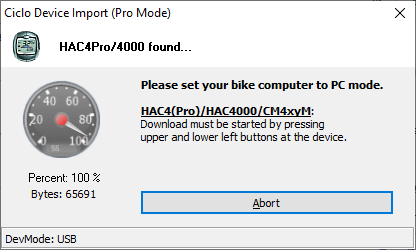
Maybe this helps...
PS: I am not related to the Ciclosport company
If this post violates the forum rules (advertising for example), please delete it -> I just remember the old days, when the Hac4 devices were state of the art and I am impressed in some way that some of these devices are still being used, yo maybe I'm able to help a little bit.
Are you using the latest CicloTour version (this should be a version >= 4.30). If you're using a Hac4Pro (4000) I assume, that the Hac4000 interface is a 'newer' USB based interface. The very old serial interfaces propably won't work with current Windows OS, but the USB based interfaces should work and at the CicloTour preferences dialog it's best to choose the USB1 Device (and not a COM-Port), because then the device will be adressed by the driver as a native USB device.
It's important that the download dialog will show a Pro/4000 Mode string in the caption bar of the download dialog, otherwise the download will not work with this device type, cause every HAC type has needed a special handling.
As far as I can remember there have been some mechanical issues with older interfaces: the cap of the interface lost pressure, so that the Hac device does not contact well to the pins of the interface. A little thin foam rubber between the interface cover and the Hac4 device was able to solve this problem.
Unfortunately the device is too old to investigate deeper, but I've done some tests some years ago when I adapt the device import routines to my TrainingLab Pro project (it's a kind of descendant of HRMProfil/CicloTour) and I was able to import some Hac4 and Pro (= 4000) devices on my current Windows 10 PC.
Due to the fact that the device importing programme code was more or less taken from the old CicloTour project, the import shoud also be possible with CicloTour under Windows 10.
Maybe this helps...
PS: I am not related to the Ciclosport company